Token Burn
AI coding agents burn tens of thousands of tokens a day. Most users find out only when they hit the limit. Token Burn puts that consumption on the menu bar.
보이지 않는 소비
Claude Code로 하루를 보내면 대략 5만에서 20만 토큰이 사라진다. Codex를 병행하면 그 이상이다. 대부분은 이 숫자를 모른다. 알게 되는 순간은 한도에 걸렸을 때뿐이다.
"5시간 한도에 도달했습니다."
그때는 이미 늦었다. 작업 흐름이 끊기고, 리셋까지 기다려야 한다.
CLI에서 /cost를 치면 현재 세션은 나오지만, 오늘 전체를 볼 수 없다. 여러 터미널, 여러 프로젝트, 여러 에이전트가 동시에 토큰을 태우고 있는데 총합을 볼 방법이 없다.
그래서 Token Burn을 만들었다.
메뉴바
macOS 메뉴바에 상주한다.

아이콘 하나에 두 가지가 들어있다:
- 가로 채움: 5시간 한도의 잔여량
- 세로 높이: 7일 한도의 잔여량
여유가 있으면 바가 가득 차 있고, 소진되면 줄어든다. 0.5초면 된다.
AI가 실제로 호출 중일 때는 바가 미세하게 뛴다. heartbeat.
패널
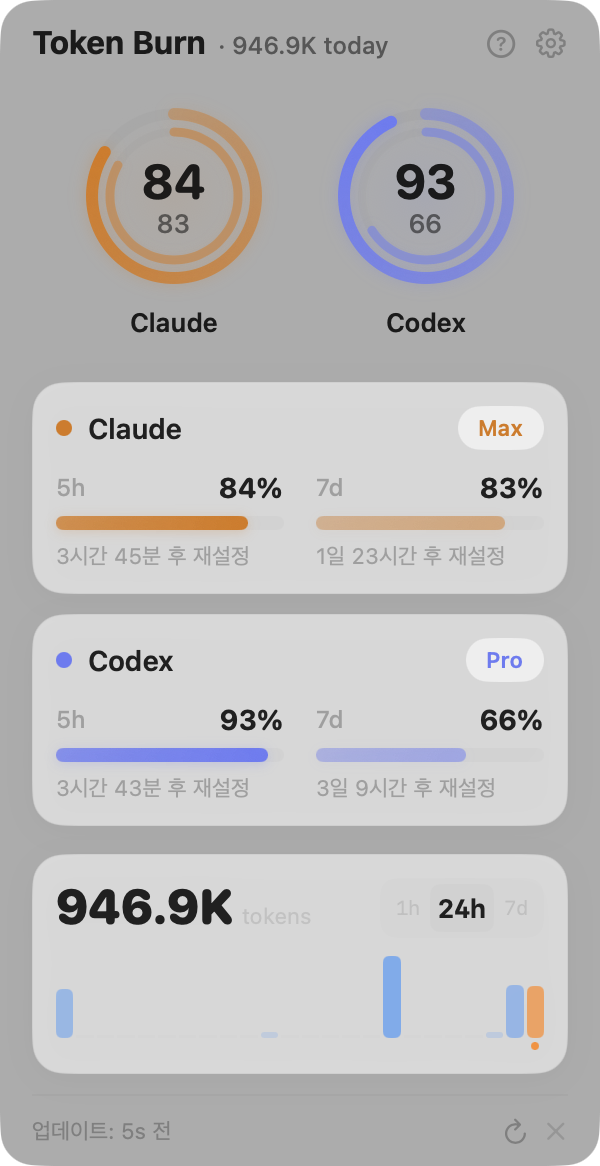
상단은 서비스별 잔여량 게이지. 하단은 토큰 소모 차트다. 1시간, 24시간, 7일을 트랙패드 스크롤로 넘긴다.
데이터는 Claude Code의 JSONL(~/.claude/projects/)과 Codex의 SQLite(~/.codex/logs_2.sqlite)를 직접 파싱한다. 서버로 보내는 건 없다.
잔여량
기존 도구는 대부분 "얼마나 썼나"를 보여준다. /cost, ccusage, TokenTracker. Token Burn은 **"얼마나 남았나"**를 먼저 보여준다.
"53% 사용"보다 "47% 남음"이 행동을 바꾼다.
만들면서 만난 것들
Claude Code는 OAuth 토큰을 macOS 키체인에 저장하는데, 갱신할 때마다 항목을 삭제하고 새로 만든다. ACL이 매번 초기화돼서 8시간마다 비밀번호를 물어봤다. 파일(~/.claude/.credentials.json)을 먼저 읽는 식으로 우회했다.
macOS 26에서는 .app 번들 안의 바이너리로 만든 NSStatusItem이 메뉴바에 안 나왔다. 같은 바이너리를 .app 바깥에서 실행하면 잘 된다. LaunchAgent로 우회했다. 우아하진 않지만 동작한다.
토큰 수치는 로컬 로그 기준이라 Claude Code /stats와 정확히 같지는 않다. 이건 UI에 표시해둔다.
앞으로
다음으로 해보고 싶은 건 프로젝트별 토큰 분석이다. "이 리팩토링에 12만 토큰을 썼다"는 걸 알 수 있다면, AI와 일하는 방식이 달라질 거다.
오픈소스다. macOS에서 쓸 수 있다.
GitHub: multi-turn-inc/ai-usage-meter
Invisible consumption
A full day with Claude Code burns roughly 50,000 to 200,000 tokens. Add Codex and it goes higher. Most users never see this number. They find out when the limit hits.
"You have reached the 5-hour limit."
By then it is too late. The workflow is broken. You wait for the reset.
/cost in the CLI shows the current session, but not the full day. Multiple terminals, multiple projects, multiple agents are all burning tokens at once, and there is no way to see the total.
So I built Token Burn.
Menu bar
It lives in the macOS menu bar.
One icon, two readings:
- Horizontal fill: remaining 5-hour quota
- Vertical height: remaining 7-day quota
When quota is plentiful, the bars are full. As they drain, they shrink. Half a second is enough.
When the AI is actively calling, the bar pulses. Heartbeat.
Panel
Top half: per-service remaining quota gauges. Bottom half: token burn chart. Switch between 1-hour, 24-hour, and 7-day scopes with a trackpad scroll.
Data is parsed directly from Claude Code's JSONL (~/.claude/projects/) and Codex's SQLite (~/.codex/logs_2.sqlite). Nothing goes to a server.
Remaining, not used
Most existing tools show "how much did I use?" — /cost, ccusage, TokenTracker. Token Burn shows "how much is left?" first.
"53% used" versus "47% remaining." The second one changes behavior.
Things encountered along the way
Claude Code stores OAuth tokens in the macOS Keychain, but deletes and recreates the entry on every refresh. The ACL resets each time, so Token Burn was asking for the Keychain password every 8 hours. Workaround: read from file (~/.claude/.credentials.json) first.
On macOS 26, an NSStatusItem created from a binary inside a .app bundle would not appear in the menu bar. Same binary outside the bundle worked fine. Workaround: LaunchAgent. Not elegant, but it works.
Token counts are based on local logs, so they do not match Claude Code /stats exactly. This is shown in the UI.
What comes next
The next thing I want to try is per-project token analysis. If you could see "this refactoring cost 120,000 tokens," the way you work with AI would change.
Open source. Available on macOS.
GitHub: multi-turn-inc/ai-usage-meter